Sell your available designs, priced the smart way.
Turn your flash sheet into a storefront. Set prices per design, adjust for size and color, and let clients book and pay for available work in seconds.
List your flash designs →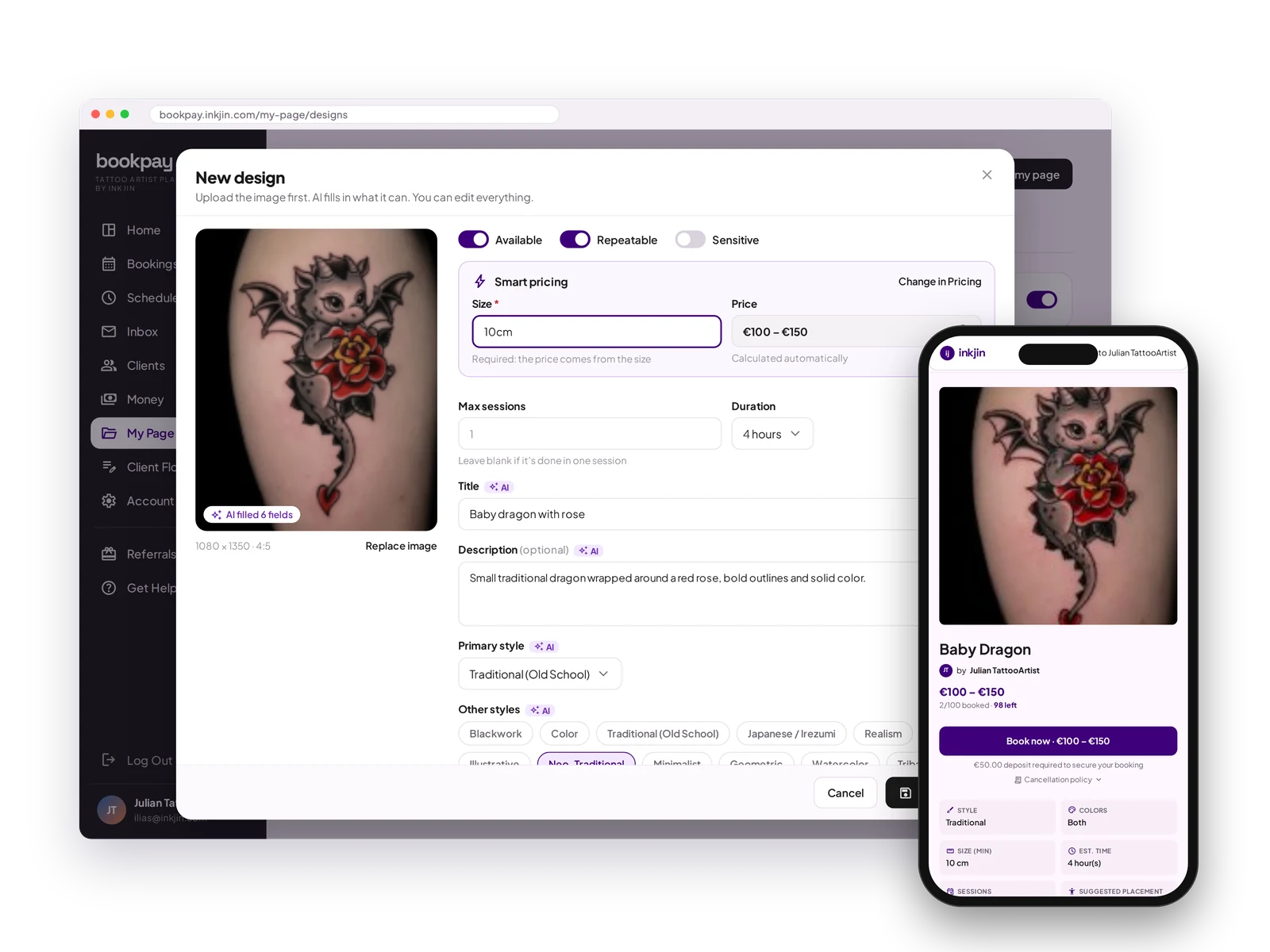
Available flash
List every available design with photos, prices and availability. Clients pick one and book it.
Smart pricing
Set your base sizes and prices, then adjust for color. Bookpay applies your rules automatically.
Repeatable or one-off
Mark a design as repeatable, or let it sell once and show as taken.
AI assisted
Upload a design and AI fills in the title, color, style and tags. Check it and you are done.
Available Flash Designs FAQ
How do I price my flash designs?
Smart pricing lets you set base sizes and prices, then adjust for color. Bookpay applies your rules to every design after that. You can also set a manual price for any design.
What happens once a design is booked?
One-off designs are marked as taken automatically, so you never book the same piece twice. Repeatable designs stay available.
Do I have to write up every design myself?
No. Upload a design and AI fills in the title, color, style and tags. Check it and you are done.
Post it, price it, sold.
Your flash sheet becomes a storefront the moment you upload it.
Open your books →